


Note: This guide is specifically for Themefisher's Astro themes. While the core concepts of internationalization apply broadly, other Astro project setups or frameworks may require different directory structures or configuration adjustments. Refer to the official docs for that: Astro Internationalization (i18n) Guide.
Converting a single-language Astro project into a robust, localized platform involves more than mere translation. It requires a structural overhaul of content architecture and routing logic.
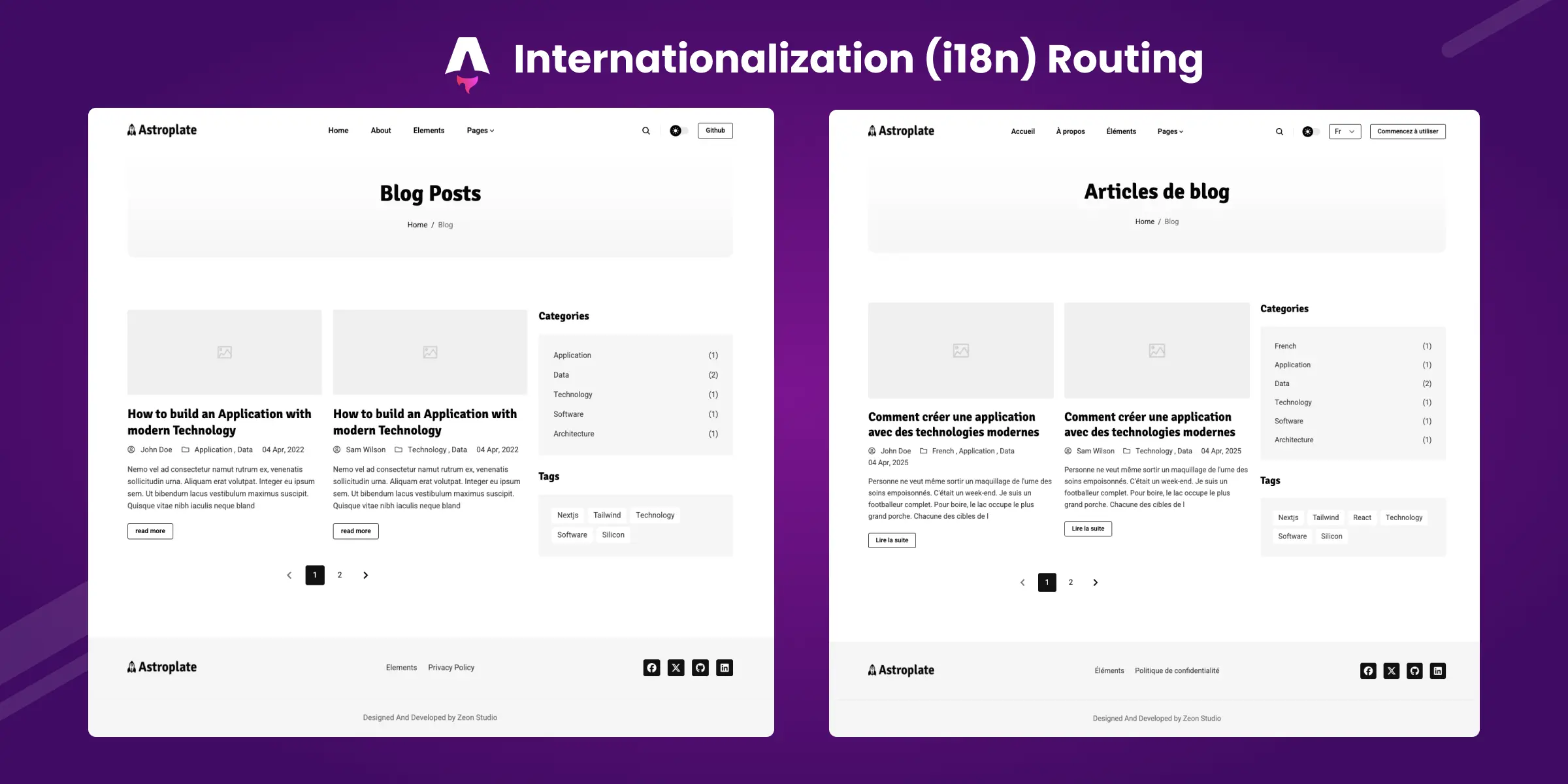
In this guide, I'll walk you through exactly how we built the multilingual version of Astroplate. The same approach you can use for any of Themefisher's Astro themes.
Let's get into it.
What You're Getting Into
Before we dive into the code, let's talk about what we're actually building here. Adding multilingual support isn't just about translating some text. It is about:
- Setting up language detection from URLs
- Restructuring all your content
- Building a language switcher that actually works
- Making sure every single link respects the current language
- Handling fallbacks when content doesn't exist in a certain language
Sounds like a lot? Yeah, it is. But we'll tackle it step by step.
Step 1: Define Your Languages
First things first, we need to inform Astro about the languages we're working with. Create a new file at src/config/language.json:
[
  {
    "languageName": "En",
    "languageCode": "en",
    "contentDir": "english",
    "weight": 1
  },
  {
    "languageName": "Fr",
    "languageCode": "fr",
    "contentDir": "french",
    "weight": 2
  }
]
Here's what's going on:
languageNameis what shows in the dropdownlanguageCodeis the URL prefix. For example,/fr/contentDiris where we'll store content for this languageweightcontrols the sort order in the switcher
Update Your Main Config
Now let's update src/config/config.json to add some multilingual settings:
{
  "site": {
    "title": "Your Theme",
    "base_url": "https://your-domain.com",
    "trailing_slash": false
  },
  "settings": {
    "default_language": "en",
    "disable_languages": [],
    "default_language_in_subdir": false
  }
}
That default_language_in_subdir is interesting. If you set it to true, your default language will use /en/ URLs. I personally prefer false so the default language lives at the root (/) but it's your call.
Step 2: Configure Astro for i18n
Now we need to tell Astro about our languages. Update your astro.config.mjs:
import { defineConfig } from "astro/config";
import config from "./src/config/config.json";
import languages from "./src/config/language.json";

const { default_language, disable_languages } = config.settings;

// Build supported languages array, filtering out disabled ones
const supportedLang = ["", ...languages.map((lang) => lang.languageCode)];
const filteredSupportedLang = supportedLang.filter(
  (lang) => !disable_languages.includes(lang),
);

export default defineConfig({
  // ... your other configs
  i18n: {
    locales: filteredSupportedLang,
    defaultLocale: default_language,
  },
  trailingSlash: "ignore", // Trust me on this one
});
The empty string "" in supportedLang is crucial. It is what allows your default language to work at the root URL.
Step 3: Set Up Translation Files
Your UI needs translations too, not just your content. Create src/i18n/en.json:
{
  "full_name": "Full Name",
  "full_name_placeholder": "Enter your full name",
  "mail_placeholder": "john.doe@email.com",
  "message": "Message",
  "message_placeholder": "Your message here...",
  "submit": "Submit",
  "read_more": "Read More",
  "page_not_found": "Page Not Found",
  "page_not_found_content": "The page you are looking for may have been removed, renamed, or is temporarily unavailable.",
  "back_to_home": "Back to Home",
  "get_started": "Get Started"
}
And create src/i18n/fr.json with the French translations. You get the idea.
Step 4: Split Your Menu Configuration
This part tripped me up initially. You can't have one menu.json anymore. Each language needs its own.
Rename your src/config/menu.json to src/config/menu.en.json, then create src/config/menu.fr.json:
{
  "main": [
    { "name": "Accueil", "url": "/" },
    { "name": "À Propos", "url": "/about" },
    { "name": "Blog", "url": "/blog" },
    { "name": "Contact", "url": "/contact" }
  ],
  "footer": [
    { "name": "À Propos", "url": "/about" },
    { "name": "Politique de Confidentialité", "url": "/privacy-policy" }
  ]
}
Step 5: Create the Language Parser (The Heart of Everything)
Alright, here's where the magic happens. This utility file is going to handle everything language-related. Create src/lib/utils/languageParser.ts:
import config from "../../config/config.json";
import languagesJSON from "../../config/language.json";

const { default_language } = config.settings;

const locales: { [key: string]: any } = {};

// Load menu and dictionary dynamically
languagesJSON.forEach((language) => {
  const { languageCode } = language;
  import(`../../config/menu.${languageCode}.json`).then((menu) => {
    import(`../../i18n/${languageCode}.json`).then((dictionary) => {
      locales[languageCode] = { ...menu, ...dictionary };
    });
  });
});

const languages = Object.keys(locales);
export { languages, locales };

/**
 * Extract language code from URL pathname
 */
export function getLangFromUrl(url: URL): string {
  const [, lang] = url.pathname.split("/");
  if (locales.hasOwnProperty(lang)) {
    return lang;
  }
  return default_language;
}

/**
 * Get translations and content directory for a language
 */
export const getTranslations = async (lang: string) => {
  const {
    default_language,
    disable_languages,
  }: { default_language: string; disable_languages: string[] } =
    config.settings;

  // Fallback to default if language is disabled
  if (disable_languages.includes(lang)) {
    lang = default_language;
  }

  let language = languagesJSON.find((l) => l.languageCode === lang);

  // Fallback to default if language not found
  if (!language) {
    lang = default_language;
    language = languagesJSON.find((l) => l.languageCode === default_language);
  }

  if (!language) {
    throw new Error("Default language not found");
  }

  const contentDir = language.contentDir;

  // Load menu and dictionary with fallback
  let menu, dictionary;
  try {
    menu = await import(`../../config/menu.${lang}.json`);
    dictionary = await import(`../../i18n/${lang}.json`);
  } catch (error) {
    menu = await import(`../../config/menu.${default_language}.json`);
    dictionary = await import(`../../i18n/${default_language}.json`);
  }

  return { ...menu.default, ...dictionary.default, contentDir };
};

// Build supported languages array
const supportedLang = ["", ...languagesJSON.map((lang) => lang.languageCode)];
const disabledLanguages = config.settings.disable_languages as string[];

// Filter out disabled languages
const filteredSupportedLang = supportedLang.filter(
  (lang) => !disabledLanguages.includes(lang),
);

export { filteredSupportedLang as supportedLang };

/**
 * Build language-prefixed URL
 */
export const slugSelector = (url: string, lang: string) => {
  const { default_language, default_language_in_subdir } = config.settings;
  const { trailing_slash } = config.site;

  let constructedUrl;

  // Determine the initial URL structure based on language
  if (url === "/") {
    constructedUrl = lang === default_language ? "/" : `/${lang}`;
  } else {
    // Add language prefix for non-default languages
    if (lang === default_language) {
      constructedUrl = url.startsWith("/") ? url : `/${url}`;
    } else {
      constructedUrl = url.startsWith("/")
        ? `/${lang}${url}`
        : `/${lang}/${url}`;
    }
  }

  // Add language path if default language should be in subdirectory
  if (lang === default_language && default_language_in_subdir) {
    constructedUrl = `/${lang}${constructedUrl}`;
  }

  // Adjust for trailing slash
  if (trailing_slash) {
    if (!constructedUrl.endsWith("/")) {
      constructedUrl += "/";
    }
  } else {
    if (constructedUrl.endsWith("/") && constructedUrl !== "/") {
      constructedUrl = constructedUrl.slice(0, -1);
    }
  }

  return constructedUrl;
};
The slugSelector function here is your best friend. Every link in your site needs to go through this function. Trust me, don't try to build URLs manually.
Step 6: Update Your Content Parser
Your existing contentParser.astro will not know about languages yet. Here is how we update it:
---
import config from "@/config/config.json";
import languages from "@/config/language.json";
import { type CollectionKey, getCollection, type CollectionEntry } from "astro:content";

const { default_language } = config.settings;

/**
 * Get the content directory for a language code
 */
const getLanguageDir = (lang: string | undefined) => {
  if (!lang) return default_language;
  const language = languages.find((l) => l.languageCode === lang);
  return language ? language.contentDir : default_language;
};

/**
 * Get list pages for a language
 */
export const getListPage = async <C extends CollectionKey>(
  collectionName: C,
  lang: string | undefined
): Promise<CollectionEntry<C>[]> => {
  const languageDir = getLanguageDir(lang);
  const allPages = await getCollection(collectionName);

  // Filter pages by language directory
  const filteredPages = allPages.filter((page) =>
    page.id.startsWith(`${languageDir}/`)
  );

  // Fallback to default language if no pages found
  if (filteredPages.length === 0 && lang !== default_language) {
    const defaultLanguageDir = getLanguageDir(default_language);
    return allPages.filter((page) =>
      page.id.startsWith(`${defaultLanguageDir}/`)
    ) as CollectionEntry<C>[];
  }

  return filteredPages as CollectionEntry<C>[];
};

/**
 * Get single pages for a language
 */
export const getSinglePage = async <C extends CollectionKey>(
  collectionName: C,
  lang: string | undefined,
  subCollectionName?: string
): Promise<CollectionEntry<C>[]> => {
  const languageDir = getLanguageDir(lang);
  const allPages = await getCollection(collectionName);

  let filteredPages = allPages.filter((page) =>
    page.id.startsWith(`${languageDir}/`)
  );

  // Filter by sub-collection if specified
  if (subCollectionName) {
    filteredPages = filteredPages.filter((page) =>
      page.id.includes(subCollectionName)
    );
  }

  // Remove draft pages
  const publishPages = filteredPages.filter(
    (page) => !page.data.draft
  );

  // Fallback to default language
  if (publishPages.length === 0 && lang !== default_language) {
    const defaultLanguageDir = getLanguageDir(default_language);
    const defaultPages = allPages.filter((page) =>
      page.id.startsWith(`${defaultLanguageDir}/`)
    );

    if (subCollectionName) {
      return defaultPages.filter(
        (page) => page.id.includes(subCollectionName) && !page.data.draft
      ) as CollectionEntry<C>[];
    }

    return defaultPages.filter((page) => !page.data.draft) as CollectionEntry<C>[];
  }

  return publishPages as CollectionEntry<C>[];
};
---
Notice the fallback logic. If someone requests a page in French but we only have it in English, they will see the English version. It's better than showing a 404.
Step 7: Restructure Your Content
This is the tedious part. You need to move all your content into language-specific folders.
Before:
src/content/images/blog/
├── -index.md
├── post-1.md
└── post-2.md
After:
src/content/images/blog/
├── english/
│   ├── -index.md
│   ├── post-1.md
│   └── post-2.md
└── french/
    ├── -index.md
    ├── post-1.md
    └── post-2.md
Do this for every content collection. Blog, authors, pages, about, contact. Everything.
Step 8: Update Your Routing
Here is where things get interesting. Instead of src/pages/index.astro, you'll create src/pages/[...lang]/index.astro. The [...lang] is a catch-all parameter that matches language codes.
Create the directory structure:
src/pages/
├── 404.astro
└── [...lang]/
    ├── index.astro
    ├── about.astro
    ├── contact.astro
    ├── blog/
    │   ├── index.astro
    │   └── [single].astro
    └── ...
Every page file needs a getStaticPaths() function. Here's the homepage:
---
import Base from "@/layouts/Base.astro";
import { getListPage, getSinglePage } from "@/lib/contentParser.astro";
import { supportedLang } from "@/lib/utils/languageParser";

// Generate static paths for all supported languages
export function getStaticPaths() {
  const paths = supportedLang.map((lang) => ({
    params: { lang: lang || undefined },
  }));
  return paths;
}

const { lang } = Astro.params;
const homepage = await getListPage("homepage", lang);
---

<Base />
  {/* Your content here */}
</Base>
Step 9: Build a Language Switcher
Users need a way to switch languages. Create src/layouts/helpers/LanguageSwitcher.tsx:
import config from "@/config/config.json";
import languages from "@/config/language.json";
import React from "react";

const LanguageSwitcher = ({
  lang,
  pathname,
}: {
  lang: string;
  pathname: string;
}) => {
  const { default_language, default_language_in_subdir } = config.settings;

  // Sort languages by weight and filter out disabled ones
  const sortedLanguages = languages
    .filter(
      (language) =>
        !(config.settings.disable_languages as string[]).includes(
          language.languageCode,
        ),
    )
    .sort((a, b) => a.weight - b.weight);

  if (sortedLanguages.length <= 1) return null;

  const handleLanguageChange = (selectedLang: string) => {
    let newPath;
    const baseUrl = window.location.origin;

    if (selectedLang === default_language) {
      if (default_language_in_subdir) {
        newPath = `${baseUrl}/${default_language}${pathname.replace(
          `/${lang}`,
          "",
        )}`;
      } else {
        newPath = `${baseUrl}${pathname.replace(`/${lang}`, "")}`;
      }
    } else {
      newPath = `/${selectedLang}${pathname.replace(`/${lang}`, "")}`;
    }

    window.location.href = newPath;
  };

  return (
    <div className="mr-5">
      <select
        className="border border-dark text-text-dark bg-transparent py-1 px-2 rounded cursor-pointer"
        onChange={(e) => handleLanguageChange(e.target.value)}
        value={lang}
      >
        {sortedLanguages.map((language) => (
          <option key={language.languageCode} value={language.languageCode}>
            {language.languageName}
          </option>
        ))}
      </select>
    </div>
  );
};

export default LanguageSwitcher;
Then add it to your header:
---
import LanguageSwitcher from "@/helpers/LanguageSwitcher";
import { getTranslations, slugSelector } from "@/lib/utils/languageParser";

const { lang } = Astro.props;
const { pathname } = Astro.url;
const { main } = await getTranslations(lang);
---

<header>
  <nav>
    {main.map((item) => (
      <a href={slugSelector(item.url, lang)}>{item.name}</a>
    ))}
    <LanguageSwitcher lang={lang} pathname={pathname}/>
  </nav>
</header>
Step 10: Update All Your Links
This is crucial. Every link in your theme needs to use slugSelector. Here's a blog card example:
---
import { slugSelector } from "@/lib/utils/languageParser";

const { post, lang } = Astro.props;
---

<article>
  {/* ❌ Don't do this */}
  <a href={`/images/blog/${post.slug}`}>Read More</a>

  {/* ✅ Do this instead */}
  <a href={slugSelector(`/images/blog/${post.slug}`, lang)}>Read More</a>
</article>
Go through every component and update the links. Yes, it is tedious. Yes, you might miss a few. Yes, you will find them later when testing. It is fine. We have all been there.
Common Issues (And How to Fix Them)
Issue #1: Links Without Language Prefix
Problem: You're on the French version but clicking a link takes you to the English version.
Solution: You forgot to use slugSelector(). Go back and check.
Issue #2: Content Not Found
Problem: 404 errors for non-default languages.
Solution: Make sure your contentDir in language.json matches your actual folder names. They need to be identical.
Issue #3: Build Fails
Problem: getStaticPaths() errors during build.
Solution: Make sure you're importing supportedLang from the right place, and remember it includes an empty string for the default language.
Issue #4: Language Switcher Not Redirecting
Problem: Changing languages doesn't work.
Solution: This happens client-side, so make sure your component is hydrated. Add a client:load directive if needed.
Testing Your Multilingual Setup
Once you've made all these changes, test thoroughly:
npm run dev
Then test these URLs:
http://localhost:4321/(should show default language)http://localhost:4321/fr/(should show French)- Click around and make sure links stay in the selected language
- Test the language switcher on every page type
Build for production and test again:
npm run build
npm run preview
Wrapping Up
Adding multilingual support to an Astro theme is definitely work, but it's manageable when you break it down into steps. The key things to remember:
- Define your languages in
language.json - Use
slugSelector()for every single link - Structure your content in language subdirectories
- Update your routing to use
[...lang] - Build a language switcher component
- Test everything thoroughly
Is it a bit of work? Yeah. But when your client sees their site working in multiple languages, or when your global traffic starts rolling in, it's totally worth it.
If you get stuck on any of this, check out our Astroplate Multilingual demo or reach out to our support team. We've helped plenty of folks through this process.
Happy coding.
For advanced configurations, edge cases, and the latest API updates directly from the framework maintainers, refer to the official resource: Astro Internationalization (i18n) Guide.